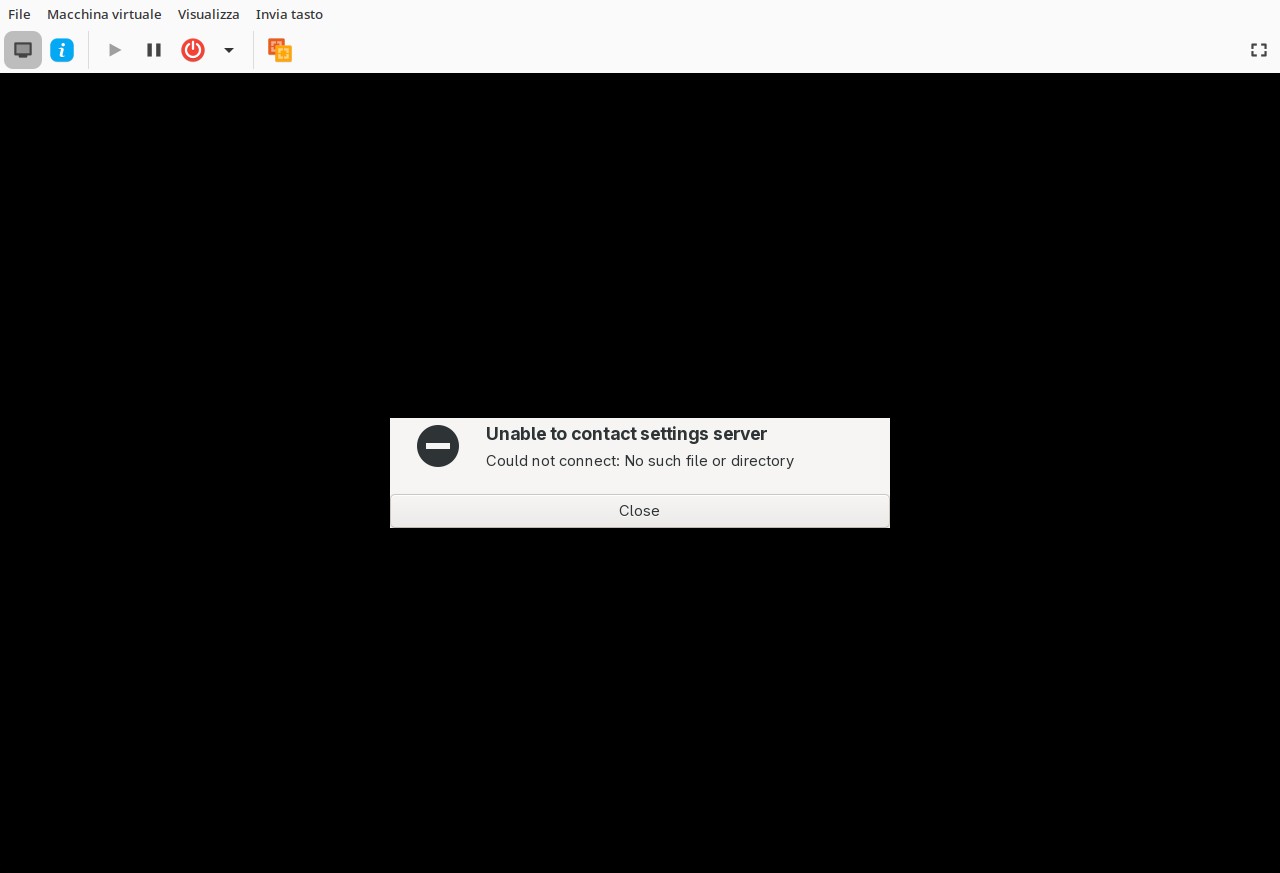
When starting both TROMjaro 2026.05.28.iso and TROMjaro 2026.07.01.iso, a non-closable window appears with the message ‘unable to contact settings server’.
This happens both from virt-manager and USB live, and the mouse is always invisible, so the window cannot be closed except with ctrl-alt-backspace.
Applying those key combinations finally the login window opens, but it is impossible to log in using the default username and password tromjaro-tromjaro.
See attached screenshot.
Hi. I cannot replicate this. What happens in Gnome Boxes?
I don’t use Gnome Boxes.
It’s significant that it doesn’t even work from a live USB via Ventoy.
Works perfectly fine in Gnome Boxes. If you can please try to see if you can replicate there too.
I will try to create a custom USB but am a bit busy at the moment.
What happens if you exit that screen?
GNOME Boxes is a QEMU/KVM and libvirt based application just like virt-manager, so it would be a useless test.
Exiting that screen is described in my first post with the inability to log in.
If it can be useful, this bug was not there before version 2026.05.28.iso so it is quite recent: before it simply worked flawlessly…
I see now. Tested with a live usb. I am looking into it thank you for reporting. I will get back to this when I find the solution.
EDIT: See this Unable to boot XFCE live USB - #49 by sylvainb - Support - Manjaro Linux Forum can you try that please? It may be a Manjaro XFCE issue…I am still investigating.
Sorry, since I couldn’t show my friends the working distro, I removed the ISO from my live USB.
However, I can say that Manjaro XFCE Live works perfectly in a virtual environment, as you can verify for yourself:
Another Manjaro-based XFCE distro also works perfectly:
However, the problem exists and has been reported by other users here:
and here:
I see. This must be a weird bug with Manjaro then….I have no clue what we can do and it works if you wait a bit?! This is odd. I will try to test more these days. Thanks a lot for the headsup.
Hi
Any working solution for this error?
I’ve had this issue for the 2-3 releases tromjaro and I haven’t been able to solve this.
First release of tromjaro I tested worked without issue but then it was updated and I decided to install it permanent but never worked. Always getting this error what ever I try from all solution options I find!
Sorry for the late reply, had to deal with some personal issues. We will release a new ISO today/tomorrow and I will update here in case anyone wants to give it another try. I do not know what the issue might be.
Tried to remove all of our XFCE and Lightdm config files. Same issue. Tried with kernel 6.12 same issue….I suspect may be some GPU related packages that are falling. Am trying more…
UPDATE: Tried reverting back all of the GPU drivers TROMjaro 2026.05.08 · 5979eac8ae - TROMjaro/iso-profiles-settings - Forgejo
Same issue….I am baffled….
I think the issue is from Manjaro, see Troubleshooting launching xfce/any session on live ISO - #15 by growler - Manjaro Development - Manjaro Linux Forum and is still a mystery….
Thanks, we hope for a solution soon.
However, it’s curious that Big XFCE Barn Stable • 2026-05-04 and Big XFCE Taliabu Stable • 2026-07-19, based on Manjaro at the time, worked and still work, while Tromjaro, based on Manjaro at the time, no longer works…
Ok folks see this Re-Release TROMjaro 2026.03.26 - IMPORTANT!
Ok released a working version TROMjaro 2026.07.24 - I hope all is ok now!
TROMjaro 2026.07.24 quickly tested live on a bare metal machine and seems to work fine.
Thank you very much.
And bug [SOLVED] 
1 Like
Awesome. Thank you for confirming!